Two ways to get your calls answered
Phone setup lives in the sidebar under Communication → Phone. Before you have a line, the page is a setup pitch ("Never miss another customer call") with two side-by-side cards — "Keep my number" (badge: Included) and "Get my own number" (badge: $25/mo) — each listing what's good and what isn't about that path. The fine print under the cards sums it up: a business line is $25/mo added to your Pool Founder subscription, prorated from today, and call answering itself is included either way. The AI assistant that answers your calls is never what the $25/mo pays for.
Number porting does not exist. You cannot bring an existing phone number into Pool Founder — a business line is always a new number. If you want to keep your current number, use the free call-forwarding path instead.
Both paths require an active paid subscription. Trial companies see "Call forwarding comes with a plan" and a "Choose a plan" button pointing to Billing — pick a plan first, then come back.
Compare the two paths
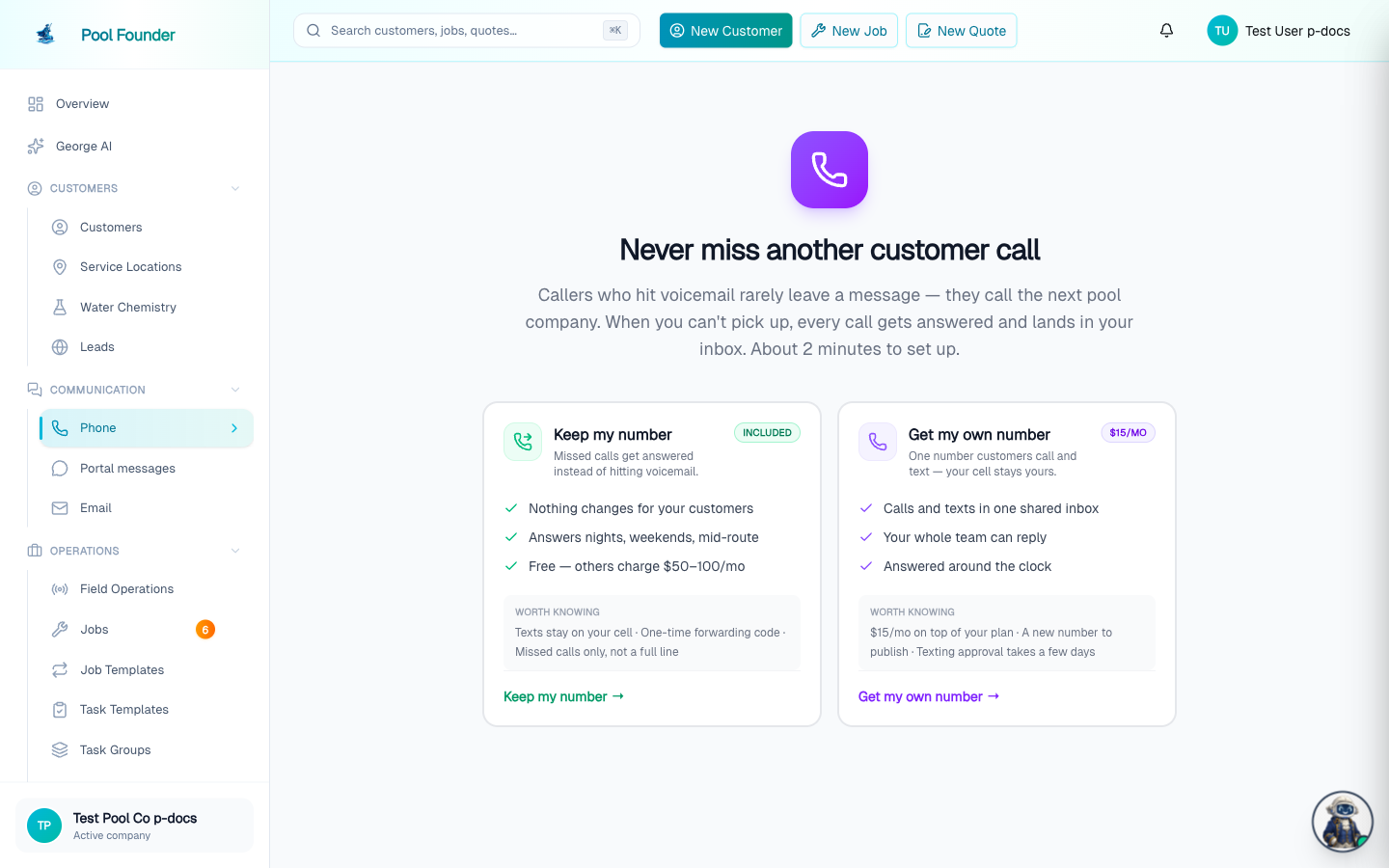
| Keep my number (Included) | Get my own number ($25/mo) | |
|---|---|---|
| Price | Included with your plan | $25/mo added to your existing subscription, prorated from today |
| How it works | You keep your published number — a private line is set up behind the scenes to catch the calls you forward to it | A real business line customers call and text directly, answered into the shared inbox |
| What's good | Your published number never changes, and your calls still get answered | The whole team can reply from one inbox, and work stops chasing your personal cell |
| Trade-offs | Texts still go to your personal phone, and you dial a forwarding code on your cell once | The $25/mo, a new number to put on the truck, website, and invoices, and texting needs carrier registration first (usually a few days) |
| Texting | Not available — texting can only run on a line Pool Founder provides | Unlocked once the free carrier registration is approved |
AI call answering is included on both paths and on every plan. For everything about texting once you have a line, see Texting and the Phone inbox.
The free path: keep your number
- 1On the Phone page, click "Keep my number". This opens the "Set up your phone" screen with a "Set up my forwarding line" button.
- 2A private line is created behind the scenes to catch forwarded calls — your published number never changes, and texting stays on your own phone. The line's area code defaults to your own cell number's area code when numbers are available there.
- 3Complete the guided answering setup (the "Set up call answering" checklist step) — see the AI phone assistant.
- 4Dial the forwarding code for your carrier once from your cell (covered below), and calls you miss start reaching the assistant.
The paid path: add a business line
Clicking "Get my own number" starts a short flow, and nothing is charged until you explicitly confirm:
- 1"Register your business for texting" comes first — the carrier (10DLC) registration form: legal business name (exactly as it appears on IRS records), business type, EIN, business address, optional website, and a contact email and phone. Registration is free — Pool Founder covers the carrier fees — and filing it is instant; the carriers review in the background while setup continues.
- 2If you pick "Sole proprietor (no EIN)" on this step, the form explains that a business line needs an EIN and offers a "Use free call forwarding instead" button that switches you to the free path — deliberately before any billing, so nobody pays for a line they can't register.
- 3Next is the "Add your business line" confirmation page: the $25/mo price badge, what's included, and fine print naming the exact card on file it will bill ("prorated from today") plus the one-way caveat. Looking at this page is free — a "Back" button returns to the registration step.
- 4Nothing is charged and no number is provisioned until you press "Add to my subscription — $25/mo". If your card is declined, you're left exactly where you were, on the confirmation page, with nothing charged or changed.
- 5After confirming, pick a preferred area code (optional) and get your number. Leave the area code blank and Pool Founder defaults to your own cell number's area code when numbers are available there, so the line looks local. The number works for calls immediately. Texting unlocks by itself when the carriers approve your registration — usually a few days, with a live progress card under Phone → Settings → Texts and a Live / Pending carrier approval / Not registered chip in the Phone section header.
Upgrade from forwarding later (one-way)
A company on the forwarding path can upgrade any time: the "Make this your business number" card under Communication → Phone → Settings → Phone line — same $25/mo, prorated, and you keep the same number. The button asks twice ("Upgrade — $25/mo", then "Click again — $25/mo") before anything is billed. The upgrade is one-way: a business number can never be switched back to forwarding, because by then the number may already be published on your truck or website, or registered for texting.
After upgrading, turn OFF the forwarding code you dialed on your cell — the number is now dialed directly, so leaving forwarding on points your cell back at your own business line and can loop the "ring first" bridge instead of ringing you. A "Turn off call forwarding" card appears under Phone → Settings → Phone line, in the Advanced group (and on the mobile Account screen), with the turn-off code for your carrier; it only shows for companies that had forwarding set up before upgrading.
Companies that had a business number before the $25/mo add-on existed are grandfathered and are not charged.
Forward your calls: carrier dial codes
On the forwarding path, the codes live under Communication → Phone → Settings → Phone line, on the Call forwarding card ("The one-time carrier code that points the number your customers already know at your assistant") — the assistant's number with tap-to-copy dial codes per carrier: Verizon *71/*72, AT&T and T-Mobile **61*.../**21*.... Each carrier offers three rows: "When you don’t answer", "All calls", and "Turn off". Pool Founder recommends the "When you don’t answer" variant so your phone rings first and the assistant only catches what you miss. The turn-off code is *73 on Verizon, ##004# on AT&T, and ##002# on T-Mobile.
- The card flips green automatically the moment a forwarded call actually reaches the assistant — that's how forwarding verifies itself. You can also click "Mark done" to record it manually.
- You can skip forwarding entirely and publish the assistant's number directly as your office line.
Troubleshooting: calls still hitting voicemail
- iPhone Live Voicemail must be OFF (Settings → Phone → Live Voicemail) — it answers on the device before conditional forwarding can trigger.
- A busy signal when dialing the code means it didn't register — listen for the confirmation tone when you dial it.
- If carrier voicemail answers before the forward timer, extend the ring time with your carrier, or verify forwarding works using the "all calls" / "every call" code first.
- Budget carriers and MVNOs (Mint, Visible) usually need forwarding set in their own app instead of dial codes.
Forward from your phone: the mobile "Forward Your Calls" screen
The technician mobile app has the same setup on the Account screen → "Forward Your Calls" (the Account tab in the bottom bar, or the person icon in the top header once the Comms tab is live). The row only appears for roles with the "Manage phone & AI front desk" permission — owners and admins by default; plain technicians never see it. It is also hidden for companies on the business-number path: that line is dialed directly, so there is nothing to forward — forwarding is only for owners who keep their own published number.
- If the company has no number yet, the screen says "You don't have a phone number yet" and its only button opens poolfounder.com — numbers can only be provisioned on the web, never from the app.
- With a number, the top card shows the assistant's number, then a carrier picker: Verizon / AT&T / T-Mobile / Other ("Other" uses the AT&T-style codes, which nearly every non-Verizon US carrier honors). Your choice is remembered on that phone.
- Picking a carrier reveals three options, each with an explanation and a button that opens your phone's dialer with the code already filled in — you just press call: "When you don't answer" (recommended — your phone rings first), "Every call" (your phone never rings), and "Turn forwarding off". The codes match the web card exactly (Verizon *71/*72/*73; GSM **61*.../**21*.../##004# or ##002#).
- If call answering is switched off, an amber warning appears at the top — forwarded calls are refused until "Answer phone calls" is turned on from the web dashboard (that switch is not on mobile).
- The screen carries the same voicemail troubleshooting and works offline — the codes are cached, and dialing them is a phone-network operation, not an internet one.
- It only dials — it records nothing on your account, so the web checklist still verifies forwarding on its own when a real forwarded call reaches the assistant.
The setup checklist
A "Finish setting up" banner sits at the top of the Phone inbox until everything is live, showing "N of M done"; click the line to expand the checklist, or the ✕ to hide it for this browser session. The steps are Get your phone number → Set up call answering → Forward your calls, and the forwarding step only exists on the forwarding path. "Set up call answering" only shows as done once answering is actually turned on, and "Forward your calls" completes on its own the moment a real forwarded call reaches the assistant — no manual verification needed; it links to Phone → Settings → Phone line, where the dial codes live. The banner shows to owners and administrators only, and disappears entirely once every step is done.
Frequently asked questions
Can I port my existing number to Pool Founder?
No — number porting does not exist. A business line is always a new number. To keep your existing number, use the free call-forwarding path: your published number never changes, and a private line behind the scenes catches the calls you forward.
Does the $25/mo pay for the AI answering?
No. Call answering is included on every plan and on both paths, including free forwarding. The $25/mo buys the business line itself — a number of your own that customers can call and text directly — and is what unlocks texting.
What happens if my card is declined on the confirmation page?
Nothing. You stay on the "Add your business line" confirmation page with nothing charged or changed. No number is provisioned until the payment goes through.
Can I give my business number back or delete it myself?
No — there is no "release this number" or "delete number" button anywhere in the product. Phone → Settings → Phone line lets you see your number, set up or turn off carrier forwarding, and upgrade forwarding to a business number; it never hands a number back. Email <a href="mailto:support@poolfounder.com">support@poolfounder.com</a> if you need to give one up.
Can I switch a business line back to call forwarding?
No — upgrading to a business number is one-way, because the number may already be published on your truck or website, or registered for texting.