The API page
Everything about the API lives on one page: sidebar → Company Settings → API. It holds the API keys manager and the endpoint documentation, including ready-to-paste cURL and JavaScript examples. The page requires the "Manage API keys" permission, which owners and admins have. There's also a "Lead API" button at the top of the Leads page that jumps straight there.
The API today is for leads only. There is no general public API yet — nothing for customers, jobs, or invoices — though more endpoints are planned. If you need an endpoint that doesn't exist, contact support at support@poolfounder.com and we'll log the request.
Create an API key
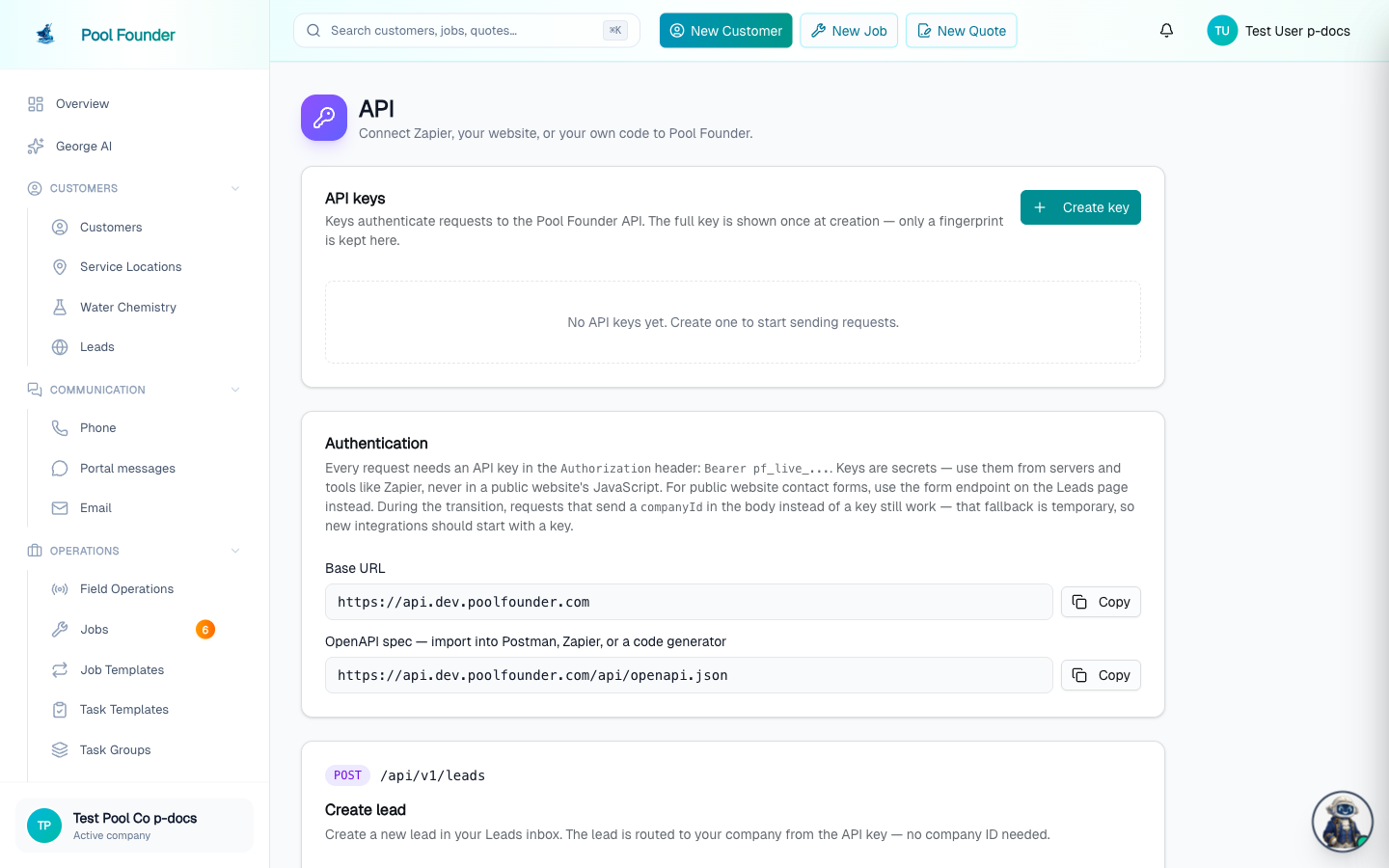
- 1On the API keys card, click Create key.
- 2Name the key after where it'll be used (e.g. "Zapier"), then click Create key.
- 3The next screen shows the full key (it starts with pf_live_) with a Copy button. This is the only time it's shown — copy it now. It cannot be recovered later, only revoked and replaced.
- The keys table lists each key's name, fingerprint (like pf_live_ab…cd12), created date, and last-used date.
- Revoke (with a confirm dialog) kills a key immediately and permanently — requests using it stop working on the spot.
Authentication
- Base URL: https://api.poolfounder.com.
- Send the key as an Authorization: Bearer pf_live_... header on every request.
- The Authentication card on the API page shows the base URL and the OpenAPI spec URL, each with a Copy button.
API keys are secrets. They're fine in Zapier and in server-side code — never in a public website's JavaScript, where anyone could read them. Public website contact forms use a separate form endpoint (POST /api/website-lead with your companyId in the body) precisely because a secret key can't live in public website code.
The Create Lead endpoint
The one endpoint so far is Create Lead: POST /api/v1/leads. Its card on the API page includes cURL and JavaScript examples, a field reference table, and response codes (200 / 400 / 401 / 429).
| Field | Required? | Notes |
|---|---|---|
| name | Required | The lead's name |
| At least one of email or phone | Send both when available | |
| phone | At least one of email or phone | Send both when available |
| address | Optional | Geocoded automatically |
| service | Optional | What they're asking for |
| message | Optional | Free-text message |
| source | Optional | Where the lead came from |
| sourcePage | Optional | The page it was submitted from |
| bodiesOfWater | Optional | Array of the property's pools/spas (type required; gallonage, sanitizer, surface optional) — sharpens the chemical estimate and carries onto the customer at conversion |
| smsConsent | Optional | Boolean. Send true only when the prospect ticked a box agreeing to be texted. It is what allows automated text follow-ups to this lead; without it the lead is followed up by email only — a lead who never asked for texts is never texted. Leads who called or texted you first are always textable and don't need it. The public form endpoint (POST /api/website-lead) accepts the same field, and rejects a non-boolean with a 400. Defaults to false. |
| suppressAutoReply | Optional | Boolean. Set to true to skip the automatic branded first reply to this prospect (the new-lead admin notification still fires). Use it when you've already replied to them yourself — for example an automation that adds someone who already texted you — so they don't get a duplicate first response. Defaults to false. |
When a lead arrives through the API, it appears in the Leads inbox instantly with the Website channel badge, triggers the standard new-lead admin notification, and sends the automatic branded first reply to the prospect — unless you set suppressAutoReply: true, which skips only that customer reply and leaves the admin notification untouched.
Rate limit: 30 accepted leads per hour per company. The API is for a live trickle of leads, not bulk loads — to bring in a whole book of contacts, use the CSV customer import instead.
smsConsent: collecting permission to text a lead
Pool Founder can text leads who go quiet — the Lead follow-up automation on Communication → Phone → Automated texts (see Leads). A lead who called or texted you is always eligible. A lead that arrives through a form or the API is only textable if you tell us they agreed, with smsConsent: true. Without it that lead is followed up by email only.
- Both endpoints accept it: POST /api/v1/leads (API key) and POST /api/website-lead (the public form endpoint, with your companyId in the body).
- Only an explicit boolean <code>true</code> counts. A string <code>"true"</code> is rejected with a 400 — Field "smsConsent" must be true or false — deliberately, so a form that looks like it is collecting consent can't silently be collecting nothing.
- Recommended checkbox wording next to the box on your form: "Text me about my request. Msg & data rates may apply. Reply STOP to opt out."
- There is no embeddable Pool Founder form. You build your own contact form and post it to the endpoint — which is exactly why the consent checkbox, and its wording, are yours to add.
OpenAPI spec
The API page links a machine-readable OpenAPI spec at https://api.poolfounder.com/api/openapi.json, ready to import into Postman or Zapier.
What the API does not cover (yet)
- There are no endpoints for customers, jobs, invoices, routes, or anything besides Create Lead. More endpoints are planned.
- Besides the API, Pool Founder's integrations are Stripe (payments) and QuickBooks Online — there are no others today.
- For anything you'd like the API to do, contact support at support@poolfounder.com.
Frequently asked questions
I lost my API key — can I see it again?
No. The full key is shown exactly once, at creation. If it's lost, revoke it and create a new one — the table only ever shows the fingerprint (like pf_live_ab…cd12).
Can I put my API key in my website's contact form?
No — keys are secrets and must never appear in a public website's JavaScript. Public website contact forms use the separate form endpoint (POST /api/website-lead with your companyId in the body) instead. Keys belong in Zapier and server-side code.
Can I bulk-import contacts through the API?
No — the Create Lead endpoint accepts up to 30 leads per hour per company. For bulk imports, use the CSV customer import instead.
Can I stop Pool Founder from auto-replying to a lead I add through the API?
Yes. Send "suppressAutoReply": true in the POST /api/v1/leads body and the automatic branded first reply (email or text) is skipped for that lead. You still get the new-lead admin notification and the lead still lands in your inbox. It's meant for cases where you've already replied out-of-band — like an automation that adds someone who already texted you — so they don't get a duplicate first response.
How do I let Pool Founder text the leads that come in from my website?
Add a texting-consent checkbox to your own form and post <strong>"smsConsent": true</strong> with the lead (both POST /api/v1/leads and POST /api/website-lead accept it). Only an explicit boolean true counts — the string "true" is rejected with a 400. Without it the lead is followed up by email only; a lead who never asked for texts is never texted. Leads who called or texted you first are always textable and need nothing. Recommended wording next to the box: "Text me about my request. Msg & data rates may apply. Reply STOP to opt out." There is no embeddable Pool Founder form — you build the form, so the checkbox is yours to add.
Is there an API for customers, jobs, or invoices?
Not yet — Create Lead is the only endpoint today. More endpoints are planned; contact support at support@poolfounder.com to log a request for what you need.